Walmart Data Scraping Services for Product Analytics
Nenodata provides Walmart Data Scraping Services for Product Analytics that turn public product, price, seller, rating, and availability signals into structured datasets for reporting.
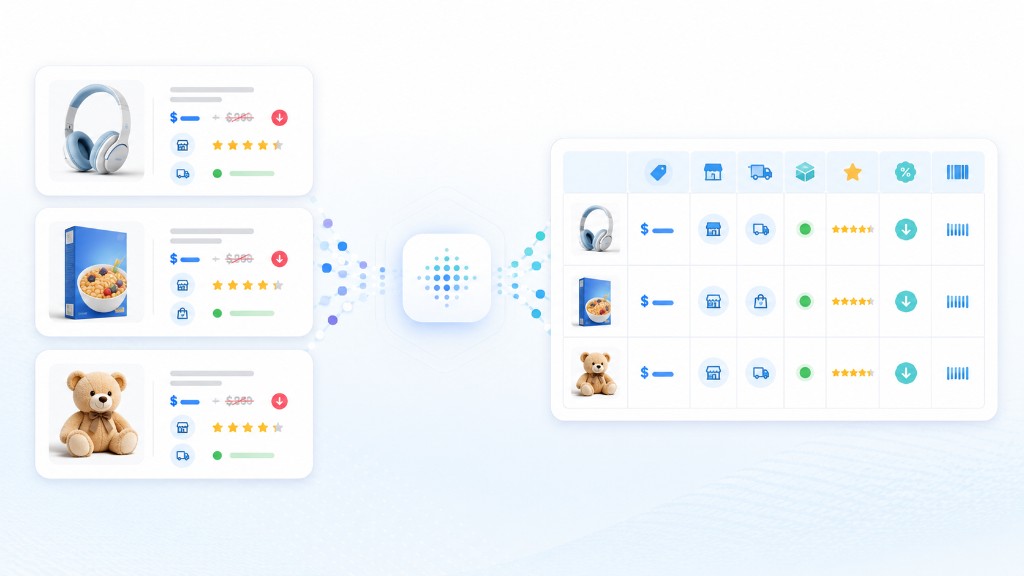
Walmart product-page volatility breaks manual analytics workflows
Walmart product pages can change by seller, rollback, product variation, fulfillment method, availability, and promotional context. A value copied into a spreadsheet this morning may no longer represent the visible offer when a pricing, category, or analytics team reviews it later.
Manual collection becomes especially difficult when teams need to monitor hundreds or thousands of items, compare Walmart first-party and third-party marketplace sellers, preserve historical snapshots, or repeat the process across categories. Basic scripts create a different problem: layouts change, fields become inconsistent, and maintenance consumes engineering time.
Product analytics workflows need more than retrieving a number from a page. Teams need relevant offer context, stable field definitions, consistent collection schedules, and output that can move directly into reporting, dashboards, and downstream analysis.
For multi-source pricing analysis, see our price intelligence solutions. For catalog extraction across multiple platforms, explore ecommerce data extraction.
Walmart Data Scraping Services for Product Analytics
Nenodata helps businesses collect structured public Walmart product, search, category, seller, rating, and availability information through a managed extraction workflow. You provide the target URLs, item IDs, keywords, categories, or monitored product set. The workflow collects the agreed fields and returns them in a consistent structure.
Depending on the project scope, the output can include current and list prices, currency, rollback and promotional indicators, Walmart item IDs, SKUs, brands, seller names, seller type, fulfillment options, product categories, stock status, ratings, review counts, and marketplace signals where publicly displayed.
Collected records are organized into the schema agreed during setup. Projects can support one-time collection or recurring delivery on a schedule confirmed during scoping. Private, account-protected, restricted, or personal information should remain outside the project scope.
Compare with the Amazon price scraper, browse all services, or review pricing.
Sample output / proof

| Field group | Example fields |
|---|---|
| Product identity | product_url, walmart_item_id, sku, product_title, brand, category_path |
| Pricing | current_price, list_price, rollback_flag, discount_text, currency |
| Seller and fulfillment | seller_name, seller_type, fulfillment_method, shipping_option |
| Availability | stock_status, pickup_available, delivery_available, store_context |
| Ratings | average_rating, review_count, rating_distribution |
| Collection metadata | collection_date, source_url, input_type, notes |
Illustrative CSV-style field list
collection_date,
source_url,
input_type,
product_url,
walmart_item_id,
sku,
product_title,
brand,
category_path,
current_price,
list_price,
rollback_flag,
discount_text,
currency,
seller_name,
seller_type,
fulfillment_method,
shipping_option,
stock_status,
pickup_available,
delivery_available,
store_context,
average_rating,
review_count
Illustrative JSON sample
{
  "collection_date": "YYYY-MM-DD",
  "source_url": "Example public URL",
  "input_type": "Example input type",
  "product_url": "Example public URL",
  "walmart_item_id": "Example item ID",
  "sku": "Example SKU",
  "product_title": "Example product",
  "brand": "Example brand",
  "category_path": "Example category path",
  "current_price": "Example value",
  "list_price": "Example value",
  "rollback_flag": "Example flag",
  "discount_text": "Example text",
  "currency": "Example currency",
  "seller_name": "Example seller",
  "seller_type": "Example type",
  "fulfillment_method": "Example method",
  "shipping_option": "Example option",
  "stock_status": "Example status",
  "pickup_available": "Example value",
  "delivery_available": "Example value",
  "store_context": "Example context",
  "average_rating": "Example value",
  "review_count": "Example value",
  "notes": "Illustrative sample only"
}Data fields and outputs

Catalog fields
- • Product title
- • Walmart item ID
- • Product URL
- • SKU where available
- • Brand
- • Category path
- • Variations where available
Pricing fields
- • Current price
- • List or was price
- • Currency
- • Rollback or clearance status
- • Discount or promotional text
Seller and fulfillment fields
- • Seller name
- • Seller type (Walmart or marketplace)
- • Fulfillment method
- • Shipping, pickup, or delivery options
- • Stock status
- • Store context where applicable
Ratings fields
- • Average rating
- • Review count
- • Rating distribution where available
- • Sponsored-product flag where available
Collection metadata
- • Collection date
- • Source URL
- • Input type
- • Keyword or category context
- • Project notes where agreed
Delivery formats
- • CSV, Excel, JSON, API-ready structures, or database/cloud-ready formats depending on confirmed scope
Product analytics use cases
Competitor price benchmarking
Pricing analysts cannot respond to changes they discover days late. A scheduled feed brings current prices, rollbacks, seller details, and availability into one dataset for comparison and pricing response decisions.
Product performance reporting
Structured product, price, seller, and rating fields support recurring reports that compare listing performance across categories, brands, and monitored product sets.
Catalog and assortment analytics
Keyword- or category-based collection can organize titles, brands, price ranges, ratings, review counts, sellers, and promotional signals into a dataset for assortment review.
Seller and offer analysis
When Walmart first-party and third-party marketplace sellers compete on the same product, seller-level fields provide a clearer record of who is offering an item and how the offer changes between collection runs.
Rating and availability tracking
Ratings, review counts, and availability signals where publicly displayed can support product analytics and competitive benchmarking once field availability is confirmed during scoping.
Category research
Category-based datasets help teams study price ranges, brand presence, seller mix, and listing signals across a defined Walmart category or keyword set.
BI and marketplace reporting pipelines
Structured CSV, JSON, Excel, or API-ready records make it easier to load recurring Walmart information into spreadsheets, databases, warehouses, and BI workflows.
Who this is for
This service is suited to ecommerce brands, marketplace sellers, manufacturers, pricing analysts, category managers, research firms, and BI teams that depend on current public Walmart product analytics data.
The strongest fit is a team with defined products, categories, fields, and reporting questions that depend on regularly refreshed public marketplace data—without dedicating internal engineering capacity to maintaining a dedicated collection workflow.
How it works
Define the dataset
Share the target product URLs, Walmart item IDs, keywords, categories, required fields, preferred output, and refresh frequency. Nenodata uses these requirements to define the collection scope and proposed schema.
Configure collection
Nenodata sets up the extraction workflow around the agreed input model. Targets may be supplied as individual product URLs, item ID lists, search terms, categories, or a recurring monitored product set.
Structure and review
Collected records are organized into consistent fields, standardized where appropriate, and reviewed for completeness. Duplicate records can be reduced before the dataset is prepared for analysis or integration.
Deliver the data
Receive the output as CSV, JSON, Excel, an API-ready structure, or a cloud- or database-ready file. Delivery can be one-time or scheduled on a daily, weekly, or custom cycle.

Why choose Nenodata
Built around your analytics workflow
The project starts with the products, categories, fields, and reporting questions that matter to your team—not a fixed generic export containing columns you do not use.
Business-ready structure
Outputs are organized for analysis and downstream workflows. Your team can define naming conventions, required identifiers, data types, and the structure expected by its reporting or storage systems.
Flexible Walmart inputs
Begin with product URLs, Walmart item IDs, keywords, categories, or an existing monitored list. This makes the service suitable for focused product sets as well as broader research workflows.
One-time or recurring delivery
Use a single extraction for a defined analytics project or establish recurring collection for ongoing product price monitoring, seller analysis, and reporting.
Managed execution
Nenodata manages the configured extraction workflow and data-delivery process, allowing internal engineering and analytics teams to focus on how the information will be used.
Responsible public-data scope
Collection should be limited to publicly available information relevant to the agreed business purpose. Private, account-protected, restricted, or personal information should not be included in the project scope.
Explore enterprise web scraping.
Delivery options

CSV and Excel
Use spreadsheets for manual review, category analysis, ad hoc reporting, and collaboration with commercial and analytics teams.
Structured JSON
Receive nested or flat JSON suited to engineering workflows, application processing, internal tools, or transformation pipelines.
API-ready output
Define records and field types so the dataset can be consumed programmatically. Confirm during scoping whether your project requires structured file delivery, a payload specification, or another integration method.
Cloud and database-ready files
Prepare output for loading into a database, warehouse, or cloud-storage location once formats and destinations are confirmed during scoping.
BI and reporting workflows
Organize recurring Walmart datasets for dashboards, reporting environments, and downstream analytics pipelines using a schema confirmed during scoping.
Contact Nenodata to scope delivery formats, cadence, and reporting workflow fit.
FAQ
Request a representative sample
Request a representative Walmart sample for product analytics reporting. Nenodata will review your scope, confirm available fields, and prepare next steps for a structured dataset.
Include target URLs or item IDs, keywords, categories, required fields, estimated volume, preferred format, and refresh frequency.